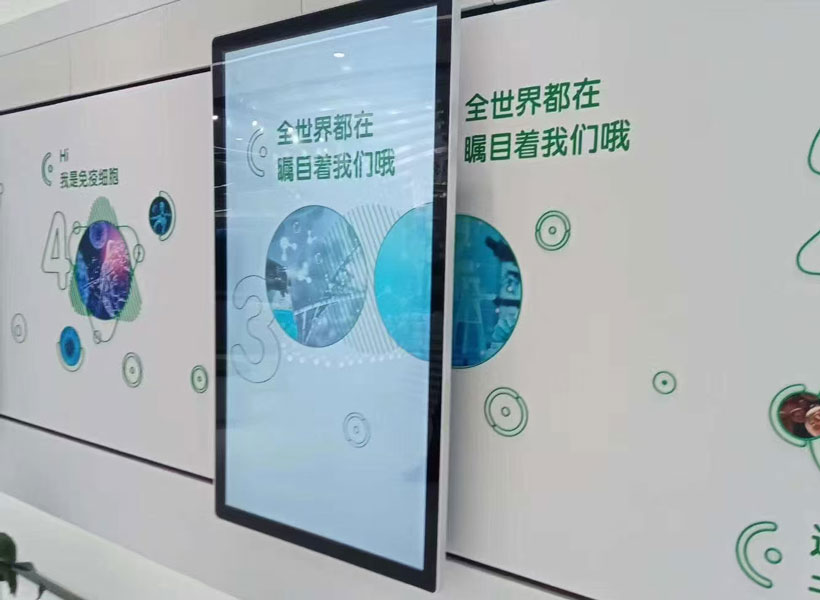
Digital indoor wayfinding signage displays have become indispensable tools for guiding visitors through complex facilities such as hospitals, shopping malls, airports, museums, and corporate headquarters. These interactive displays not only reduce confusion and improve the visitor experience, but they also serve as powerful branding assets and operational aids. However, their continuous operation in demanding indoor environments places significant stress on both hardware and software components. Without a structured maintenance regimen, even the most reliable digital signage systems can suffer from screen degradation, system crashes, outdated wayfinding data, and ultimately, a loss of user confidence. To ensure that your digital indoor wayfinding displays remain sharp, accurate, and dependable, it is essential to adopt a proactive maintenance strategy that addresses cleaning, hardware integrity, software health, environmental factors, and professional support.
1. Routine Cleaning and Display Care
The visual clarity of a wayfinding display is its most critical attribute. Dust, fingerprints, and smudges accumulate quickly on touchscreens and protective glass, especially in high-traffic areas. Regular cleaning not only preserves image quality but also prevents abrasive particles from scratching the surface over time.
Use Proper Cleaning Materials
Always use a microfiber cloth and a cleaning solution that is specifically designed for electronic screens. Avoid ammonia-based cleaners, alcohol, or harsh chemicals, as these can strip anti-reflective and oleophobic coatings, leading to permanent damage. Apply the solution to the cloth, never directly to the screen, to prevent moisture from seeping into bezels and ports. For touchscreens, also consider UV-C disinfection wipes that are safe for electronics, especially in healthcare environments where hygiene is paramount.
Establish a Cleaning Schedule
Frequency depends on foot traffic and ambient dust levels. A minimum of once per week is recommended, but high-touch public areas may require daily cleaning. Maintain a log of cleaning activities, noting any visible irregularities such as cracks, discoloration, or dead pixels. This simple record can help identify wear patterns and inform replacement schedules.
2. Hardware Inspection and Connection Integrity
The reliability of wayfinding displays hinges on the condition of their internal and external hardware. Loose cables, degraded connectors, and failing power supplies are among the most common causes of unexpected downtime.
Check Cables and Mounts
Inspect all visible cabling, including power cords, network cables, and signal lines, for signs of fraying, kinks, or corrosion. Ensure that mounting brackets and security fasteners remain tight, as vibrations from HVAC systems or building movement can loosen them. Pay special attention to the area around the display’s recesses, where cables can become pinched or overheated. If any damage is detected, schedule immediate replacement using manufacturer-approved parts.
Inspect Power and Ventilation
Digital displays generate heat, and internal fans or passive heat sinks are designed to manage it. Over time, dust can clog vents and fans, causing overheated components to throttle performance or fail entirely. At least quarterly, use a soft brush or compressed air to clean ventilation openings. Verify that fans are spinning smoothly and quietly, and test power supplies with a multimeter to ensure stable voltage output. Also, confirm that the display is connected to a surge protector or uninterruptible power supply (UPS) to guard against power fluctuations.
3. Software Updates and Content Management
Wayfinding displays depend on software for rendering maps, processing touch inputs, and communicating with central content management systems (CMS). Outdated software can lead to compatibility issues, security vulnerabilities, and inconsistent user experiences.
Firmware and Operating System Updates
Monitor the display manufacturer’s release notes and apply firmware updates as they become available. These updates often fix bugs, enhance performance, and patch security holes. For displays running Android, Windows, or Linux-based systems, ensure that the underlying operating system receives scheduled updates as well. Before deploying updates, test them in a staging environment where possible, then roll them out during low-traffic hours to minimize disruption.
Wayfinding Content Accuracy
The value of a wayfinding system lies in its accuracy. If a tenant moves, a room is renamed, or a corridor is temporarily closed, the digital maps must be updated promptly. Establish a workflow for content review that involves facility management and marketing departments. Schedule automatic content validation checks to ensure that all links, search functions, and route calculations are working correctly. Additionally, back up the content database regularly and store versions securely to allow quick rollback in case of data corruption.

4. Environmental and Placement Considerations
Even though the signage is indoors, environmental conditions can significantly impact its longevity and readability. Ignoring these factors is a common oversight.
Temperature and Humidity Control
Most digital displays are rated for operating temperatures between 0°C and 40°C and relative humidity between 20% and 80%. Locate the display away from direct sources of heat, such as radiators, air vents, or sunny windows that may create hotspots. Conversely, excessive humidity can cause condensation inside the housing, leading to short circuits. In humid environments, consider using a dehumidifier in the room or a display with a higher ingress protection (IP) rating.
Lighting and Glare Mitigation
Indoor lighting can cause glare or reflections that make the screen hard to read, tempting users to press harder or repeatedly tap the screen. Position the display so that overhead lights do not directly reflect off the glass. If necessary, install anti-glare filters or adjust screen brightness and contrast to match ambient lighting conditions. Regularly recalibrate touch sensors if users complain about inaccurate touches, as this can result from physical wear or electrostatic interference.
5. Preventive Maintenance Scheduling
A structured preventive maintenance plan is far more cost-effective than reactive repairs. It is advisable to create a comprehensive schedule that divides tasks into different frequencies.
Daily, Weekly, and Monthly Tasks
Daily: Conduct a quick visual check to ensure the screen is on, responsive, and displaying correct information. Note any error messages or frozen pages.
Weekly: Clean the screen and bezels, inspect external cables, and verify that the CMS is in sync with the display.
Monthly: Test all interactive features, including touch response, audio output (if any), and network connectivity. Clean ventilation openings and check that fans are free of obstruction. Also, audit uptime logs to detect intermittent failures.
Quarterly Professional Servicing
Every three months, schedule a deeper inspection performed by trained technicians. This includes opening the enclosure to check internal components, reseating RAM and storage drives, testing battery backups, measuring display brightness with a luminance meter, and evaluating power supply health. The same service can also update the device inventory, replacing aging parts such as fans and capacitors before they fail.

6. Troubleshooting Common Issues
Even with meticulous maintenance, occasional issues will arise. Knowing how to react quickly and correctly minimizes downtime.
Display Malfunctions
If a screen goes blank, first check the power source and the brightness settings. If the screen has a backlight but no image, the issue may be a faulty signal cable or a crashed operating system. Use remote management software to reboot the display if available. Should the display fail to recover, contact your technical support team or the original equipment manufacturer for diagnostics. Never attempt to open the display while it is still powered on, as high-voltage components pose a serious hazard.
Connectivity and Network Issues
Wayfinding displays often rely on network connections for content updates and real-time data. Intermittent disconnections can lead to stale information. Begin by checking Ethernet cables and Wi-Fi signal strength. Verify that network switches and routers are functioning properly and that firewalls are not blocking essential ports. For displays that use multicast for live updates, confirm that the network is properly configured to permit multicast traffic. In the case of persistent issues, replace network cables and switch ports as a diagnostic step.
7. Partnering with a Trusted Maintenance Provider
While internal staff can handle routine cleaning and basic checks, complex diagnostics and hardware repair often require specialized knowledge. This is where a reputable partner can make a significant difference. KTX GROUP LTD is a leading provider of digital signage solutions and comprehensive maintenance services. With years of experience in deploying and servicing indoor wayfinding displays across various industries, KTX GROUP LTD offers tailored preventive maintenance plans, 24/7 remote monitoring, rapid on-site response, and genuine replacement parts. Their certified technicians understand the unique demands of high-traffic environments and follow strict service protocols to ensure minimal disruption. By partnering with KTX GROUP LTD, organizations can extend the life of their wayfinding assets, reduce operational costs, and maintain a consistently professional appearance. Whether you need a one-time system audit or a full lifecycle maintenance contract, KTX GROUP LTD provides the expertise and responsiveness that modern facilities require.

In conclusion, the longevity and effectiveness of digital indoor wayfinding signage displays are not achieved by accident. They demand a disciplined approach to cleaning, hardware inspection, software management, environmental control, and professional servicing. By implementing the maintenance strategies outlined above and collaborating with a trusted partner like KTX GROUP LTD, facility managers can ensure that their wayfinding systems operate at peak performance, delivering accurate, engaging, and reliable guidance for every visitor, day after day.