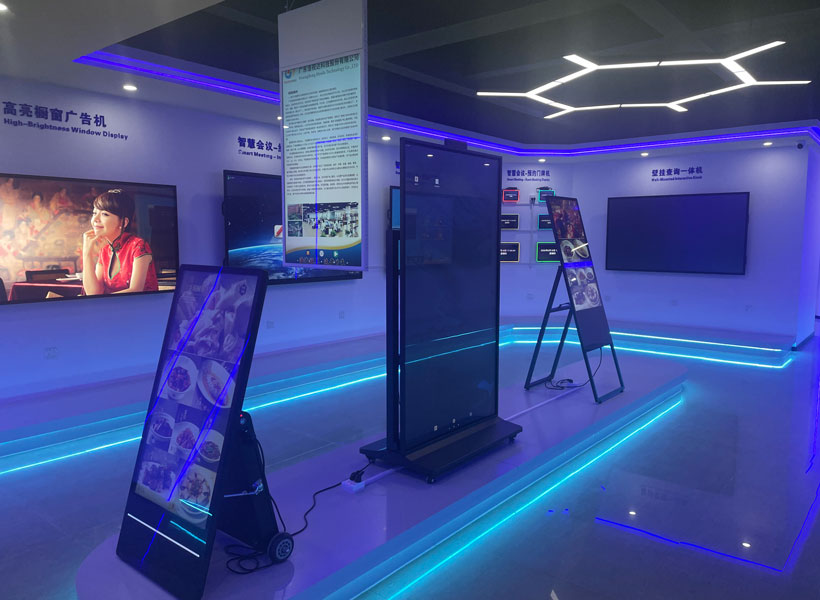
When budgeting for indoor digital signage, many small business owners are tempted to save money by purchasing consumer-grade televisions. While the upfront price tag is lower, this decision often leads to higher long-term costs. Consumer TVs are not designed for 24/7 operation in commercial environments. They lack the robust cooling systems, brighter panels for well-lit lobbies, and durable components needed for continuous use. A consumer TV may fail within a year, requiring replacement and lost advertising revenue during downtime.
Opt for Commercial-Grade Displays with Long Lifespan
Instead, invest in commercial-grade displays from a trusted brand like KTX. KTX’s indoor signage screens are engineered for extended duty cycles—often rated for 50,000 to 60,000 hours of continuous use. They come with built-in temperature management and anti-burn-in technology, drastically reducing the risk of failure. Although the initial price is slightly higher than a consumer TV, the total cost of ownership over three to five years is significantly lower. For example, a KTX 43-inch commercial display may cost $100 more upfront than a television, but it eliminates the replacement cost of $300 every 12–18 months that a consumer unit might require. That’s a net saving of at least $500 over three years.
Consider All-in-One Digital Signage Players
Another hardware cost trap is buying separate media players, cables, mounts, and adapters. These add-ons not only increase upfront expenditure but also complicate installation and troubleshooting. KTX offers all-in-one digital signage solutions that integrate the media player directly into the display or provide a compact Android-based player preloaded with their management software. By choosing an integrated KTX system, you eliminate the need for an external PC, HDMI cables, power adapters, and mounting shelves. This simplicity reduces both material costs and labor charges for setup. Moreover, KTX’s unified design improves reliability—fewer components mean fewer potential failure points, saving you repair and replacement expenses down the road.
2. Software Strategies: Avoid Recurring Fees with Smart Choices
Software is often the silent budget killer in digital signage. Many platforms charge per screen per month, and those costs can quickly exceed the hardware investment. For a small business with two or three screens, paying $20–$50 per screen each month adds up to thousands annually.
Use Free or Low-Cost Content Management Systems
KTX provides a proprietary cloud-based content management system (CMS) that is included with their hardware, with no per-screen licensing fees. This is a game-changer for cost-conscious owners. You get features like drag-and-drop scheduling, playlist creation, and remote monitoring without the burden of recurring subscription costs. Alternatively, if you already have legacy hardware, KTX’s software is compatible with many Android-based players, so you can repurpose existing devices. By bundling software with hardware, KTX eliminates the biggest ongoing expense in digital signage.
Utilize Pre-Designed Templates to Save Design Costs
Hiring a graphic designer for every content update is prohibitive for most small businesses. KTX’s CMS includes a library of hundreds of professionally designed templates—for promotions, announcements, menus, social media feeds, and more. These templates are fully customizable, allowing you to change colors, fonts, images, and text with a few clicks. Instead of paying $50–$150 per design task, you can create engaging content in minutes. Even better, many templates are optimized for specific screen resolutions (e.g., 16:9 or 9:16 vertical), ensuring your content looks polished without expensive rework. The savings in design labor alone can cover the cost of the KTX display within the first year.
3. Content Creation on a Shoestring: Repurpose, Automate, and Schedule
Content is the fuel of digital signage, but creating it from scratch every week can drain your time and money. Small businesses need efficient workflows that maximize impact while minimizing effort.
Repurpose Existing Marketing Materials
You already have valuable content: your website banners, social media posts, email newsletters, and product flyers. Instead of designing new graphics for the signage screen, convert those assets into signage-friendly formats. KTX’s CMS supports direct import of images, PDFs, and even live RSS feeds. For example, take a weekly promotion post from Instagram and resize it for your lobby screen. If you run a café, use your menu PDF as a rotating image set. Repurposing reduces content creation time by 80%, which translates to free labor savings.
Schedule Content to Reduce Manual Work
Many small business owners manually update their signage every day or week, burning precious staff hours. KTX’s scheduling feature lets you set up an entire month’s worth of content in advance. You can create playlists that automatically switch between morning specials, lunch menus, event announcements, and happy hour deals. For instance, schedule a “Weekday Breakfast” playlist from 6 a.m. to 11 a.m., then automatically transition to “Lunch Combos” from 11 a.m. to 2 p.m. Once set, your staff never needs to touch the system again. This eliminates recurring labor costs and ensures your advertising is always timely—driving higher sales without additional expense.
4. Energy and Maintenance: Small Changes, Big Savings
Running digital signage 12 hours a day, seven days a week, adds to your electricity bill. Over a year, power consumption can be a hidden cost that erodes your budget.
Enable Auto-Brightness and Sleep Mode
KTX commercial displays come with built-in ambient light sensors that automatically adjust screen brightness based on the surrounding light level. In a dimly lit office or store, the screen can reduce brightness to 30% of maximum, cutting power usage by up to 60%. Additionally, use the built-in timer to put the display into sleep mode during closed hours. For a typical small business operating 10 hours a day, this can drop annual electricity costs by $50–$100 per screen. KTX’s energy-efficient panels (rated Energy Star where applicable) also generate less heat, reducing air conditioning load during summer—a secondary saving.
Routine Maintenance to Extend Lifespan
Preventive maintenance is cheap compared to emergency replacements. Dust accumulation on vents and fans can cause overheating and premature failure. Clean your KTX display’s vents monthly with compressed air. Also, keep the firmware updated through KTX’s cloud management—updates often include performance optimizations that reduce power draw and improve reliability. By dedicating 15 minutes per month to maintenance, you can extend the display’s life by 1–2 years, delaying the need for a costly replacement.
5. Alternative Financing: Leasing and Rental Options
High initial capital outlay is a common barrier for small businesses. But you don’t have to buy your digital signage outright.
Lower Initial Investment with Leasing from KTX
KTX offers flexible leasing programs tailored for small businesses. Instead of paying $800–$1,500 per display upfront, you can lease a full system (hardware, software, and installation) for a low monthly fee. This converts a one-time capital expense into predictable operating expenses. More importantly, leasing often includes maintenance and software updates, so you avoid surprise repair costs. At the end of the lease term, you can upgrade to newer technology without disposing of outdated equipment. For a business with limited cash flow, leasing can reduce setup costs by 70–80% compared to outright purchase.
6. Start Small, Scale Smartly
It’s tempting to install digital signage in every corner of your business at once. But over-investing prematurely can strain your budget and lead to unused screens.
Start with One Screen and Expand
Begin with a single KTX display in your highest-traffic area—the front counter, entrance lobby, or waiting room. Measure its impact: Are sales increasing? Do customers engage with the content? Once you prove ROI, you can gradually add more screens. KTX’s modular ecosystem allows you to connect additional displays without replacing existing hardware. This incremental approach spreads the cost over time and ensures each screen pays for itself before the next one is installed. Plus, buying one screen now and a second six months later often lets you take advantage of price drops or promotional bundles.
7. Leverage Free Content Sources and Partnerships
Creating all content in-house is not the only way. Many small businesses can tap into free, high-quality external content to keep their screens fresh.
Incorporate Social Media Feeds, News, and Weather Widgets
KTX’s CMS supports embedding live feeds from Instagram, Facebook, Twitter, YouTube, and RSS news sources. For a retail store, display your latest Instagram posts automatically—this content is free, authentic, and generated by your customers. For a café, show a scrolling weather forecast and local news headlines. These feeds require zero design effort and update themselves. The result is dynamic, engaging content that costs nothing in labor or software. You can also integrate free stock photo libraries (like Unsplash) to create rotating background images, further reducing content creation expenses.
Overall Cost-Saving Strategy for Small Business Indoor Digital Signage
The key to saving money is not to cut corners on essential quality, but to make intelligent choices at every stage—hardware, software, content, energy, and financing. By selecting KTX commercial-grade displays with integrated players, using their free CMS, repurposing existing materials, automating scheduling, and considering leasing, you can achieve a professional advertising system for a fraction of the typical cost. Remember, a well-planned digital signage investment can increase customer dwell time, upsell products, and improve brand perception—generating revenue that far outweighs the initial outlay. Start with a single screen, monitor your metrics, and let the savings from those practices fund future expansion. In the end, the most profound cost-saving tip is this: invest in a solution that grows with you, not one that empties your wallet every month.